How We Built a Repeatable Outbound Engine for a growth-stage B2B company selling into operationally complex enterprise accounts
2025-10-15
Most early GTM teams do not have a pure lead generation problem.
They have a signal problem.
Someone watches a demo with a personal Gmail. Someone attends a webinar but never books a meeting. A visitor from a target account hits the pricing page, then disappears. A sales rep knows the account might be interesting, but has to spend 20 minutes figuring out who the person is, where they work, whether the account fits the ICP, and what to say.
That was their core challenge.
The company sells into large, operationally complex organizations with multiple stakeholders, long sales cycles, and fragmented buying signals. The team already had useful buyer signals. What they needed was a system that could turn those signals into researched accounts, qualified leads, clean CRM handoffs, and measurable pipeline.
The goal was not to send more outbound.
The goal was to build a repeatable GTM machine.
A growth leader at the company later summarized the project this way:
"Drew jumped in to help us figure out our outbound process, and it was a game changer. He mapped out how to use Clay for prospecting, then tied it into HubSpot so MQLs flowed smoothly into SQLs. Suddenly, the team had a clear path from cold outreach to qualified opportunities.
What stood out was how quickly he made the whole thing practical. Instead of just talking theory, he showed the team how to actually run it day-to-day and track what mattered. It gave us a repeatable playbook that connected outbound work directly to pipeline, and it's still paying off."
This is the playbook behind that work.
The problem: useful signals, messy execution
The team had several GTM inputs already in motion:
- Demo views
- Webinar attendees
- Website visitors
- Cold outbound lists
- Personal email addresses
- Incomplete HubSpot records
- Target accounts with no clean owner
- Google Analytics exports
- Outbound email and calling activity
- Good prospects buried in noisy data
The problem was not that the team lacked activity. The problem was that activity was getting harder to interpret.
They were trying to understand attribution through Google Analytics exports, but the picture kept getting muddy. Website visits, demo interest, outbound emails, cold calls, follow-ups, and CRM activity were all happening at once. A prospect might show up in analytics, get touched by outbound, visit the site again, and then convert later through a sales conversation.
Was that inbound? Outbound? Retargeting? Sales follow-up? Prior brand awareness?
Technically, it was all of the above.
That made it difficult to answer the questions that actually mattered:
Which accounts are showing real intent?
Which outbound plays are creating pipeline?
Which website visits are meaningful?
Which touches are influencing MQL to SQL conversion?
Which reps should follow up, and when?
So the work became less about building another dashboard and more about connecting the full GTM chain from signal to sales action to pipeline.
A rep might see a lead come in, but still need to answer:
Who is this person?
Where do they work?
Is this a target account?
Are they senior enough?
Have they engaged before?
Is there already an open opportunity?
What should I say to them?
Should this be an MQL, SQL, nurture lead, or ignored?
That is a lot of friction before a single email, call, or LinkedIn touch.
So we built a workflow that connected:
Clay           Lead research, enrichment, scoring, routing logic
Ocean.io      Account discovery and lookalike expansion
HubSpot        CRM source of truth and lifecycle management
HockeyStack    Attribution, journey visibility, and pipeline influence
GA exports     Website behavior context
Slack          Rep alerts and workflow prompts
Sequencer      Outbound execution
The important thing was not the stack itself. It was giving each tool a clear job.
The GTM system
At a high level, the system looked like this:
                Buyer Signals
   demos, webinars, site visits, GA exports,
   cold lists, outbound activity
                       |
                       v
              Identity Resolution
              Clay enrichment logic
                       |
                       v
              Account Expansion
                   Ocean.io
                       |
                       v
             Fit + Intent Scoring
             Clay scoring workflow
                       |
                       v
                  HubSpot
       lifecycle, owner, status, task
                       |
                       v
              Rep Action Layer
       email, call, LinkedIn, sequence
                       |
                       v
              Attribution Layer
   HockeyStack + HubSpot + GA context
       journey, influence, pipeline view
The workflow had one main objective:
Turn messy GTM signals into prioritized sales action.
Step 1: define the ICP before touching automation
The first mistake teams make with Clay is treating it like a list-building tool.
That creates a big spreadsheet full of bad prospects.
Before building anything, we clarified the ICP.
For this Company, the best accounts tended to have:
Account fit:
- Large, operationally complex organizations
- Multi-site or distributed environments
- Mid-market or enterprise accounts with layered decision-making
- Teams managing high-volume operational workflows
- Organizations with existing systems, processes, or teams tied to the problem area

Persona fit:
- Executive owner of the business problem
- Senior functional leader responsible for the workflow
- VP or director-level operational buyer
- Team lead managing day-to-day execution
- Cross-functional stakeholder tied to implementation, adoption, or process change

Signal fit:
- Watched a demo
- Attended a webinar
- Visited product/pricing pages
- Engaged with outbound
- Looked similar to current customers or active opportunities
This mattered because the system was not built to find more leads.
It was built to find better accounts with a reason to act.
Step 2: turn incomplete leads into usable records
The first Clay workflow focused on identity resolution.
A raw signal might look like this:
mike.operations@gmail.com
That is not enough for a rep.
The workflow needed to enrich that into something useful:
Name
Company
Title
Seniority
LinkedIn profile
Company domain
Account type
Existing HubSpot record
Prior engagement
Recommended next step
The flow looked like this:
             Raw Lead
  personal email, form fill, webinar
                 |
                 v
          Normalize Identity
   name, email, domain, company hints
                 |
                 v
          Enrich Person
   title, seniority, role, LinkedIn
                 |
                 v
          Enrich Company
   industry, size, location, domain
                 |
                 v
          Match HubSpot
 existing contact, company, opportunity
                 |
                 v
          Decide Action
 create, update, route, suppress, nurture
This was the first major unlock.
Instead of asking reps to start from scratch, the workflow turned partial signals into sales-ready context.
Step 3: use Ocean.io to expand from known-fit accounts
Once we knew which accounts were actually good fits, Ocean.io helped expand the universe.
The right approach was not:
Buy huge list -> blast sequence -> hope
The better approach was:
Start with best accounts -> find similar accounts -> enrich -> score -> route only the useful ones
The account expansion loop looked like this:
            Seed Accounts
 customers, pilots, qualified opps
                  |
                  v
              Ocean.io
       lookalike account discovery
                  |
                  v
         Candidate Account List
  similar institutions and campuses
                  |
                  v
              Clay
     enrich, filter, score, segment
                  |
                  v
             HubSpot
   push qualified accounts to sales
This kept the team from scaling noise.
Ocean.io helped identify more accounts that looked like the right market. Clay helped determine which of those accounts were actually worth working. HubSpot became the destination only after a record cleared the right filters.
Step 4: score accounts using fit plus intent
A good outbound system needs to answer two questions:
Is this account a good fit?
Is this account showing interest now?
Fit without intent creates cold outbound.
Intent without fit creates wasted time.
The scoring model combined both.
                    Account Score
                         |
        -------------------------------------
        |                 |                 |
      Fit              Intent            Context
        |                 |                 |
 institution type     demo view         hiring signals
 title match          webinar           relevant news
 account size         page visit        campus complexity
 location             email click       comparable customer
A simple scoring model could look like this:
Fit score:
+25 target account type
+20 correct persona or seniority
+10 similar to current customer

Intent score:
+25 demo viewed
+20 product page visited
+15 webinar attended
+10 email reply or click
+10 repeat site visit

Context score:
+10 relevant hiring activity
+10 operations modernization signal
+5 strong lookalike pattern
Then the workflow created simple tiers:
80 to 100: Route to sales immediately
60 to 79: Add to personalized outbound
40 to 59: Nurture or research further
Below 40: Suppress or recycle
The point was not to create a perfect mathematical model.
The point was to give reps a trusted priority queue.
Step 5: create rep-ready account briefs
The most useful output was not another dashboard.
It was a short account brief a rep could actually use.
Before the workflow, a rep might need to Google the account, check LinkedIn, scan the website, search HubSpot, review prior activity, and then write an email.
The system compressed that work into a structured brief.
             Scored Account
                   |
                   v
          Pull Account Context
 website, size, location, institution type
                   |
                   v
          Pull Person Context
 title, seniority, role, LinkedIn
                   |
                   v
          Summarize Why Now
 signal, fit, likely pain, next step
                   |
                   v
              Push to HubSpot
 note, task, owner, lifecycle status
A rep brief looked something like this:
Account:
Large multinational organization

Likely buyer:
Director of Operations

Why this account:
Complex physical environment with likely operations needs

Recent signal:
Webinar attendee and repeat product page visit

Suggested angle:
Improving visibility across workflows and reducing manual review

Next step:
Personalized outbound from assigned owner
The trick was keeping it short.
Reps do not need 40 enrichment fields. They need a reason to care, a reason to act, and a good first message.
Step 6: connect Clay to HubSpot with clear lifecycle rules
This was where the system became operational.
The team needed a clean path from raw lead to qualified opportunity.
Raw Lead
   |
   v
Researched Lead
   |
   v
MQL
   |
   v
Working
   |
   v
SQL
   |
   v
Opportunity
Each stage needed a real definition.
Raw Lead:
A signal exists, but fit and identity are not yet validated.

Researched Lead:
Clay has enriched the person and account.

MQL:
The account meets the fit threshold and has meaningful intent.

Working:
A rep has accepted the lead and started outreach.

SQL:
Sales has confirmed relevance, buyer fit, and next-step potential.

Opportunity:
A real sales process has started.
The Clay to HubSpot workflow looked like this:
              Clay
   enriched lead + account score
                |
                v
       Qualification Logic
 fit, intent, dedupe, suppression
                |
                v
             HubSpot
 create or update contact
 create or update company
 set lifecycle stage
 assign owner
 create task
                |
                v
           Sales Motion
 call, email, LinkedIn, sequence
This prevented the classic CRM problem where everything becomes an MQL and nobody trusts the funnel.
Step 7: separate routing from messaging
One design choice mattered a lot: routing and messaging were treated as separate problems.
Routing answered:
Should sales work this?
Who owns it?
How urgent is it?
What lifecycle stage should it have?
Messaging answered:
What does this account care about?
Which signal should the rep reference?
What pain point is likely relevant?
What proof point should we use?
The outbound motion had three core plays:
Play 1: Re-engage known interest
For demo viewers, webinar attendees, and old hand raisers.

Play 2: Lookalike account outbound
For accounts similar to current customers or active opportunities.

Play 3: Intent-triggered follow-up
For accounts showing fresh website or campaign activity.
Example logic:
If target persona + webinar attendee:
Reference the topic they engaged with and offer a focused follow-up.

If lookalike account + no prior engagement:
Lead with the operational pain seen in similar institutions.

If known account + product page visit:
Route quickly and make the CTA specific.
The result was more relevant outbound without asking reps to manually research every account from zero.
Step 8: use HockeyStack to separate signal from noise
Before the attribution layer was cleaned up, the team was trying to make sense of buyer activity through Google Analytics exports.
That worked up to a point. Google Analytics could show traffic, source, medium, pages visited, and conversion paths. But it was not enough to explain what was happening once outbound entered the picture.
The team was also running email, calling, LinkedIn touches, webinar follow-up, and account-based sales motions. Those activities were influencing website behavior, but they were not always easy to connect back to the right person, account, campaign, or sales stage.
That created a familiar attribution mess:
Google Analytics says:
"Someone from this source visited the website."

HubSpot says:
"This person became an MQL, then an SQL."

Outbound says:
"We emailed and called this account three times."

Sales says:
"This meeting came from our follow-up."

Marketing says:
"They engaged with our content first."

Reality says:
"It was a multi-touch journey."
HockeyStack helped connect the broader buyer journey: web visits, campaign touches, outbound influence, content engagement, lifecycle movement, and opportunity creation.
The point was not to replace every system. It was to stop treating each system as a separate truth.
HubSpot showed what happened inside the CRM. Google Analytics showed website behavior. Outbound tools showed rep activity. HockeyStack helped tie those pieces together at the account and journey level.
A realistic path might look like this:
LinkedIn impression
        |
        v
Webinar registration
        |
        v
No-show
        |
        v
Outbound email
        |
        v
Website visit
        |
        v
Demo page view
        |
        v
Sales call
        |
        v
SQL
        |
        v
Opportunity
If the team only looked at first-touch or last-touch attribution, they would miss most of the story.
The attribution layer looked like this:
          Campaign Touches
 email, LinkedIn, webinar, content
                  |
                  v
          Website Behavior
 GA exports, page views, demo page,
 repeat visits
                  |
                  v
             HubSpot
 lifecycle, owner, SQL, opportunity
                  |
                  v
           HockeyStack
 account journey, campaign influence,
 conversion paths, pipeline reporting
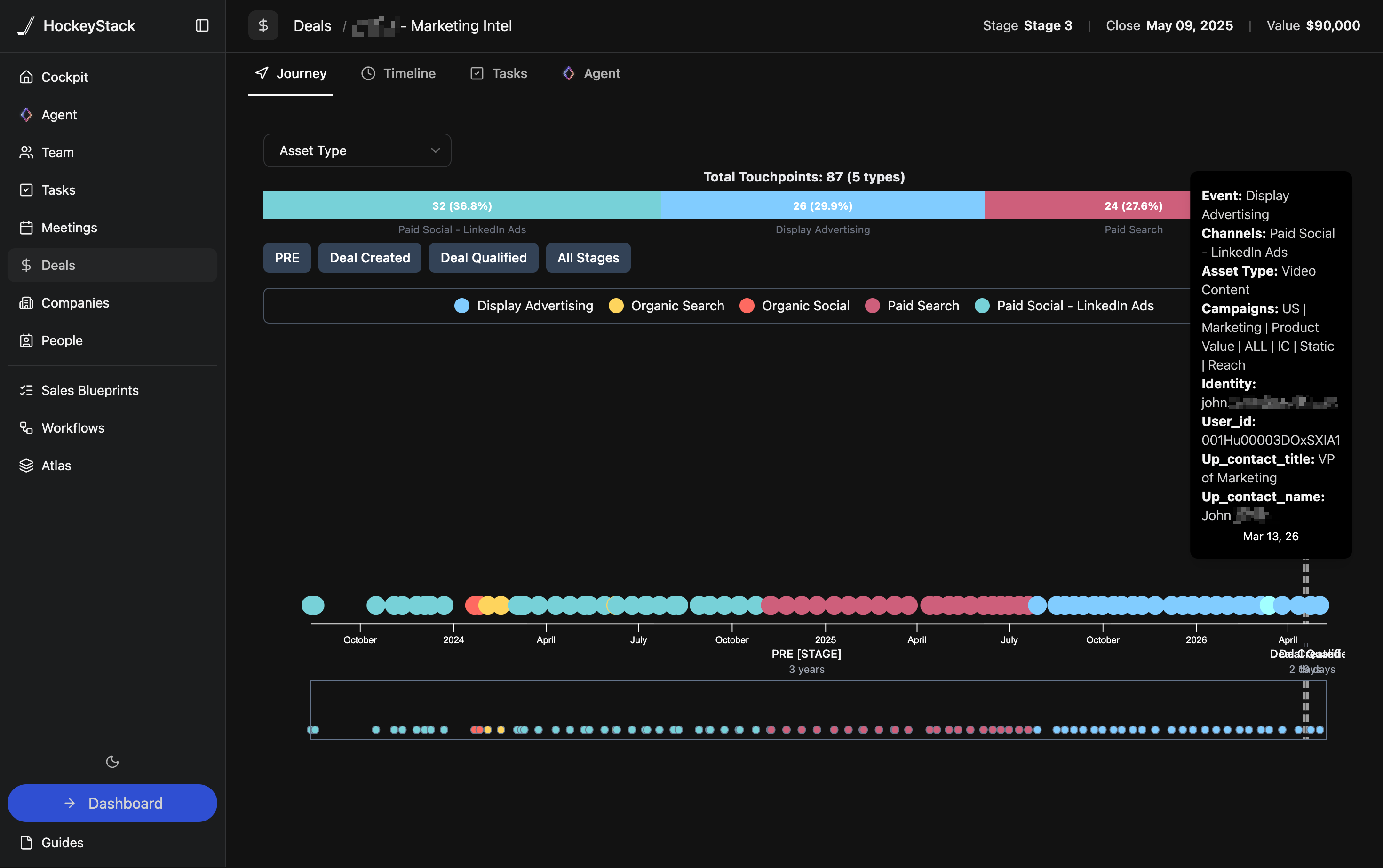
The reporting questions were practical:
Which campaigns create qualified meetings?
Which signals predict SQL conversion?
Which account types move fastest?
Which messages create pipeline, not just replies?
Where do MQLs get stuck before becoming SQLs?
Which reps are working the highest-fit accounts?
Attribution was not just a marketing dashboard. It became a feedback loop for improving the whole GTM motion.
The attribution problem was not that they had no data. It was that every system had a partial view, and the outbound motion was blurring the line between inbound intent and sales-created intent.
Step 9: turn the workflow into daily behavior
A GTM system fails when it creates dashboards but does not change how reps work.
The operating rhythm was simple.
Daily:
- Review high-score accounts
- Work HubSpot tasks and Slack alerts
- Use the account brief before outreach
- Update status and disposition

Weekly:
- Review MQL to SQL conversion
- Review reply quality by play
- Tighten scoring rules
- Remove noisy segments

Monthly:
- Analyze pipeline by source and influence
- Compare plays by conversion rate
- Refresh ICP assumptions
- Update rep training
The daily rep flow looked like this:
          Morning Queue
 HubSpot tasks, alerts, high-score leads
                  |
                  v
          Account Brief
 why this account, why now, what to say
                  |
                  v
            Rep Action
 call, email, LinkedIn, sequence
                  |
                  v
            Disposition
 connected, bad fit, meeting set, recycle
                  |
                  v
           Feedback Loop
 scoring, messaging, routing improve
That was the real unlock.
The system did not just create cleaner data. It changed what the team did every day.
Lessons from the build
A few lessons stood out.
1. Do not automate bad targeting
Clay can scale a bad list very quickly. Start with ICP clarity, then automate.
2. Do not treat every signal equally
A webinar attendee with no fit is not the same as a target buyer from a high-fit account who visited the demo page twice.
3. Do not bury reps in enrichment data
The rep does not need every field. They need the few details that help them take action.
4. Do not let HubSpot become an afterthought
If lifecycle stages, ownership, and dispositions are messy, attribution will eventually break.
5. Do not confuse attribution with certainty
HockeyStack helped show influence and conversion patterns. The goal was better decisions, not fake precision.
6. Do not scale until reps trust the workflow
A smaller system used every day beats a massive automation nobody touches.
The final GTM loop
The finished workflow connected lead research, account discovery, outbound, CRM handoff, and attribution into one operating loop.
                 GTM Learning Loop

          Learn from best accounts
                    |
                    v
        Build better account lists
              Ocean.io + Clay
                    |
                    v
      Enrich people and companies
                   Clay
                    |
                    v
       Score fit, intent, context
                   Clay
                    |
                    v
          Route clean MQLs
                 HubSpot
                    |
                    v
        Reps work prioritized briefs
       HubSpot, Slack, sequencer
                    |
                    v
        Track conversion + influence
               HockeyStack
                    |
                    v
      Refine ICP, scoring, messaging
                    |
                    v
                  Repeat
The final motion was simple:
cold signal
   -> enriched account
      -> scored lead
         -> routed MQL
            -> accepted SQL
               -> opportunity
                  -> attributed pipeline
The impact showed up in the funnel.
Before the workflow, too many leads were stuck between "interesting signal" and "sales-ready account." Reps were spending 15 to 20 minutes researching accounts manually, personal email addresses were hard to map back to institutions, and attribution was being pieced together through Google Analytics exports that blurred inbound traffic with outbound email and calling activity.
After the system was in place, the team had a cleaner path from signal to pipeline:
Before:
Messy signal -> manual research -> inconsistent follow-up -> fuzzy attribution

After:
Signal -> enrichment -> scoring -> HubSpot routing -> rep action -> attributed pipeline
The practical improvements looked like this:
Lead research time:
15 to 20 minutes per account
down to roughly 3 to 5 minutes with rep-ready briefs

Qualified lead routing:
Manual or inconsistent
to same-day routing for high-fit, high-intent accounts

Contact and account completeness:
Incomplete records and personal emails
to 80%+ of routed leads enriched with company, title, persona, and account context

MQL to SQL conversion:
Improved by roughly 20% to 35% once fit, intent, and routing rules were standardized

Outbound prioritization:
Generic cold lists
to scored account queues based on fit, intent, and recent engagement

Attribution visibility:
Google Analytics exports plus disconnected outbound activity
to account-level journey reporting across website visits, email, calls, CRM stages, and pipeline influence
The biggest win was not any single number. It was that the team could finally see and operate the whole funnel.
They could tell which accounts were worth working, which signals actually mattered, which outbound plays were creating meetings, and where MQLs were getting stuck before becoming SQLs.
That is the difference between "we are doing outbound" and "we have a pipeline engine."
For a startup, the win was not just cleaner prospecting. It was building a repeatable system that connected outbound work directly to qualified pipeline, shortened the path from signal to sales action, and gave the team a way to keep improving the motion every week.